

Topograph Slinky Engine#
Overview#
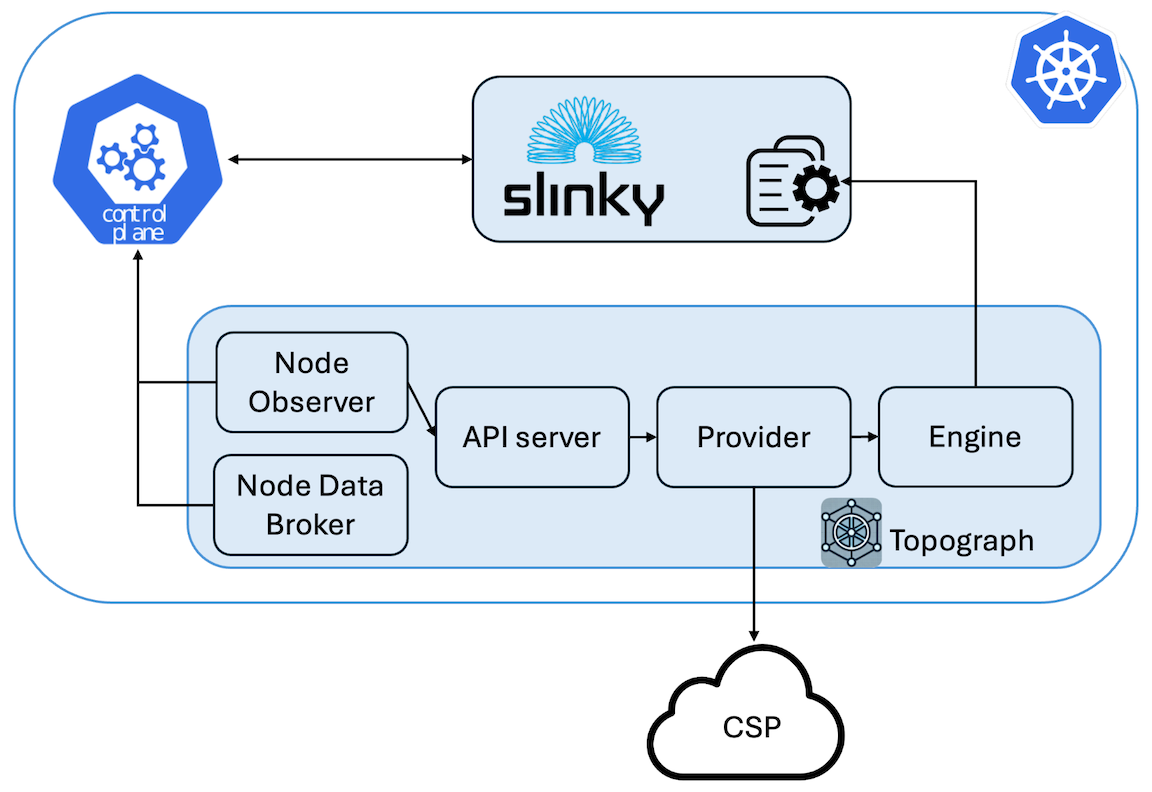
The slinky engine is Topograph’s engine for SLURM clusters running on Kubernetes. It is designed to work with the Slinky project - an open-source set of integration tools by SchedMD that brings SLURM capabilities into Kubernetes environments.
While the Slinky project provides comprehensive SLURM-on-Kubernetes orchestration (operators, schedulers, exporters, etc.), Topograph’s slinky engine complements this ecosystem by providing topology discovery and configuration management for SLURM clusters running in Kubernetes.
The Slinky engine bridges the gap between Kubernetes infrastructure and SLURM workload management by updating SLURM topology configurations stored in Kubernetes ConfigMaps.
How It Works#
- Node Discovery: Queries Kubernetes nodes and SLURM pods to build a topology map
- Topology Generation: Creates SLURM topology configuration (tree or block format)
- ConfigMap Management: Updates the specified ConfigMap with new topology data including metadata annotations for tracking and debugging
Configuration#
Topograph is deployed as a standard Kubernetes application using a Helm chart.
Topograph is configured using a configuration file stored in a ConfigMap and mounted to the Topograph container at /etc/topograph/topograph-config.yaml.
In addition, when sending a topology request, the request payload includes additional parameters.
The parameters for the configuration file and topology request are defined in the global section of the Helm values file, as shown below:
Shared with the Kubernetes engine: because the Topograph API server runs as a Kubernetes workload regardless of the engine, anything about the chart’s deployment surface — values-schema validation,
helm testhooks, access patterns (ClusterIP port-forward, Ingress, Gateway APIHTTPRoute), PrometheusServiceMonitor,NetworkPolicyguidance, and the chart’sREADME.md— is shared with the Kubernetes engine and documented authoritatively inengines/k8s.mdandengines/k8s.md#exposing-the-topograph-api. Those sections apply equally to Slinky deployments.
global:
  # provider – name of the cloud provider or on-prem environment.
  # Supported values: "aws", "gcp", "oci", "nebius", "nscale", "netq", "infiniband-k8s", "dra".
  provider: aws
  engine: slinky
  engineParams:
    namespace: ns-slinky                       # Namespace where Slinky is running
    podSelector:                               # Label selector for pods running SLURM nodes
      matchLabels:
        app.kubernetes.io/component: compute
    plugin: topology/block                     # Name of the topology plugin
    blockSizes: [4]                            # (Optional) Block size for the block topology plugin
    topologyConfigmapName: slurm-config        # Name of the ConfigMap containing the topology config
    topologyConfigPath: topology.conf          # Key in the ConfigMap for the topology config
Per-partition topologies#
When per-partition topologies are configured, each entry may declare how its node membership is resolved:
| Field | Behavior |
|---|---|
nodes | Explicit SLURM node list. Takes precedence over podSelector. |
podSelector | Kubernetes LabelSelector matching the slurmd pods in the partition. The engine lists pods in the engine’s namespace, filters to Ready pods, and reads each pod’s SLURM name from the slurm.node.name label (falling back to pod.spec.hostname). |
| neither | The engine falls back to running scontrol show partition <name> inside a login pod (legacy behavior). |
nodes and podSelector are mutually exclusive on the same entry; configuring both returns a validation error at engine load time.
global:
  engineParams:
    namespace: ns-slinky
    podSelector:
      matchLabels:
        app.kubernetes.io/component: compute
    topologies:
      gpu-partition:
        plugin: topology/block
        blockSizes: [8, 16]
        podSelector:                                   # partition membership by pod labels
          matchLabels:
            app.kubernetes.io/component: compute
            slurm.partition: gpu
      cpu-partition:
        plugin: topology/tree
        nodes: ["cpu-[001-032]"]                       # explicit list
      default:
        plugin: topology/flat
        clusterDefault: true                           # no podSelector, no nodes → scontrol fallback
Using nvidia.com/gpu.clique for block topology#
On MNNVL Kubernetes clusters, the NVIDIA GPU Operator can label nodes with nvidia.com/gpu.clique. When useGpuCliqueLabel is enabled, the Slinky engine uses that label as the source for topology/block domains instead of the accelerator domains returned by the provider. This is useful with cloud API providers whose InstanceTopology.AcceleratorID describes a broader provider domain than the GPU Operator clique label.
The option only affects block topology. Tree topology still comes from the selected provider, and the engine still maps Kubernetes nodes to Slurm nodes through the configured slurmd pod selector.
global:
  engine:
    name: slinky
    params:
      namespace: ns-slinky
      podSelector:
        matchLabels:
          app.kubernetes.io/component: compute
      plugin: topology/block
      blockSizes: [8, 16]
      topologyConfigmapName: slurm-config
      topologyConfigPath: topology.conf
      useGpuCliqueLabel: true
If useGpuCliqueLabel is enabled for a block topology and no matching nodes have the nvidia.com/gpu.clique label plus the Topograph instance annotation, topology generation fails with a 502 error instead of falling back to provider accelerator domains.
ConfigMap Annotations#
Slinky automatically adds metadata annotations to managed ConfigMaps for improved observability:
apiVersion: v1
kind: ConfigMap
metadata:
  name: slurm-config
  annotations:
    # Topograph metadata
    topograph.nvidia.com/engine: "slinky"
    topograph.nvidia.com/topology-managed-by: "topograph"
    topograph.nvidia.com/last-updated: "2024-01-01T10:11:00Z"
    topograph.nvidia.com/slurm-namespace: "slurm"
    topograph.nvidia.com/plugin: "topology/tree"
    topograph.nvidia.com/block-sizes: "8,16,32"

    # Original annotations preserved
    meta.helm.sh/release-name: slurm
    meta.helm.sh/release-namespace: slurm
data:
  topology.conf: |
    SwitchName=sw1 Switches=sw[2-3]
    SwitchName=sw2 Nodes=node[1-4]
    SwitchName=sw3 Nodes=node[5-8]
Annotation Reference#
| Annotation | Description |
|---|---|
topograph.nvidia.com/engine | Engine that manages this ConfigMap |
topograph.nvidia.com/topology-managed-by | Indicates topograph manages topology data |
topograph.nvidia.com/last-updated | RFC3339 timestamp of last update |
topograph.nvidia.com/slurm-namespace | SLURM cluster namespace |
topograph.nvidia.com/plugin | Topology plugin used (tree/block) |
topograph.nvidia.com/block-sizes | Block sizes for block topology |
Usage Examples#
Topograph runs autonomously in Kubernetes environments, including Slinky. When the Node Observer detects a selected node or pod change, or sees the Topograph API server become ready after startup or a container restart, it sends topology requests to the API server. The API server then triggers an update to the network topology information within the cluster. However, if you want to manually trigger network topology discovery, you can send HTTP requests to the API server, as shown below.
Topology Configuration in the Tree Format#
curl -X POST -H "Content-Type: application/json" \
  -d '{
    "provider": {"name": "aws"},
    "engine": {
      "name": "slinky",
      "params": {
        "namespace": "ns-slinky",
        "podSelector": {
          "matchLabels": {
            "app.kubernetes.io/component": "compute"
          }
        },
        "topologyConfigPath": "topology.conf",
        "topologyConfigmapName": "slurm-config"
      }
    }
  }' \
  http://localhost:49021/v1/generate
Topology Configuration in the Block Format#
curl -X POST -H "Content-Type: application/json" \
  -d '{
    "provider": {"name": "aws"},
    "engine": {
      "name": "slinky",
      "params": {
        "namespace": "ns-slinky",
        "podSelector": {
          "matchLabels": {
            "app.kubernetes.io/component": "compute"
          }
        },
        "topologyConfigPath": "topology.conf",
        "topologyConfigmapName": "slurm-config",
        "plugin": "topology/block",
        "blockSizes": [8,16,32]
      }
    }
  }' \
  http://localhost:49021/v1/generate